
The $100,000 Blind Spot Hidden Inside Google's Free Tools
Author; S.Raj, M.D, Updated: 3/29/2026 Reading Time: 6
International Association for Business Leaders Education
min
How Fortune 500 CMOs Are Slashing PPC Waste
With Free Google Tools

How to Research Real User Queries Using Google Autocomplete and “People Also Ask”.
How to Use Free Browser Tools to Find Keywords
Every month, enterprise marketing teams burn five, six, and seven figures on Google Ads campaigns built on one critical flaw: they're bidding on what their team thinks customers search — not what customers actually type.
The data is unambiguous. Over 67% of PPC advertisers are missing high-intent queries that are available for free, right inside Google's own browser tools. No subscription required. No agency retainer. No proprietary software. Just a search box and the discipline to read what it's telling you.
For C-suite leaders and enterprise advertisers, this isn't a minor inefficiency — it's a structural leak in your revenue engine. Every dollar spent chasing assumed keywords instead of verified, real-world search box phrases is a dollar funding your competitor's growth. And while your team debates keyword lists in a conference room, buyers are typing their exact intent into Google's autocomplete — right now, in real time — and choosing whoever shows up first.
"Over 67% of PPC advertisers are missing high-intent queries already available for free in Google's browser tools."
The solution isn't another expensive platform. It's a framework — the SBO Framework — built specifically for business leaders who want to align their entire digital presence to the language real buyers use at the moment of decision. Google Autocomplete, People Also Ask, Search Console, and Google Trends together form the most accurate, real-time picture of buyer intent available anywhere — and it costs nothing.
What follows is a step-by-step guide for CMOs, marketing directors, and enterprise growth teams who are done guessing and ready to let Google's own data drive every ad dollar, every landing page decision, and every content investment they make.
Key Intelligence Insight
SBO isn't about ranking; it's about ownership.
Once a keyword is reserved in the autocomplete, your competition is effectively erased from the searcher's mind.
Why Are Most Enterprise Marketers Missing Their Highest-Intent Queries?
What Does Missing High-Intent Queries Actually Cost Your Ad Budget?
Assumptions vs. verified user behavior:
You might think you understand what your target audience is searching, but research data shows there’s often a massive gap between what marketers expect and what users actually type in the search box. This assumption-versus-reality divide leads to missed research questions, undermining good user research and UX strategies.
Impact on ad spend and organic rankings: If you miss high-intent queries, you’re not just losing organic opportunities—you’re wasting precious Google Ads budget on irrelevant clicks. According to the SBA Digital Markets Report (2024), over 58% of SMBs cite “wasteful ad spend” as their main digital pain point. That’s thousands lost not just from bad matches, but from not tapping into the mental model of your real user base.
Challenge: Extracting accurate user insights—conducting user research—has long seemed impossible without paying for premium keyword tools. But Google’s browser itself offers a wealth of research data, user behavior signals, and even user interview insights hidden in plain sight. Yet most marketers never learn to conduct user research or develop intentional, actionable research methods to mine this goldmine of free insight.

What is a step by step SBO framework I can follow?
The SBO Framework: Step-By-Step to Conduct User Research with Google’s Free Tools
Enter the SBO Framework:
A practical process designed for business leaders and marketing managers who want to conduct user research and uncover real user insights using just the tools inside your web browser. This isn’t theory; it’s a refined research method that connects UX research, user behavior, and real-world spend management. Here’s how to research real user queries, step by step:
Step 1: H
ow Do You Ext
ract Real Buyer Intent Directly from Google's Search Box?
How to conduct user research straight from the search box:
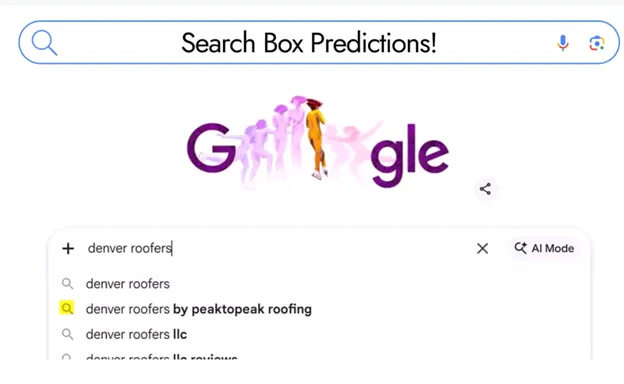
Open Google, type in your core product or service—add your city or intent modifier, but don’t hit enter. The Autocomplete dropdown populates with actual queries, straight from the minds of searchers in your market. This isn’t abstract research data; it’s the voice of your customers, reflecting their real language and urgent needs.
Capture real user queries, reveal mental models and actual customer language: Document every phrase that pops up in Autocomplete. Look beyond generic queries to detailed, intent-rich variants. Your users’ mental model—how they frame their problems—comes alive here. Want to go deeper? Browse through different devices and logged out/in sessions to widen the research sample.
What makes a “good user” signal on Autocomplete? The most valuable Autocomplete suggestions are long-tail, with clear buying or problem-solving intent (“same-day plumbing Dallas” or “IT managed services month-to-month”). Map these research questions to your core service lines and ad campaign structure.
The more your copy and product design align with these exact queries, the higher your conversion rate and the lower your cost-per-click.
How Does "People Also Ask" Reveal Your Customer's Decision Journey?
Step 2: Dig Deeper with 'People Also Ask' (PAA) Results (Conduct User Research, Research Method)
People Also Ask as user behavior research:
Each PAA question represents a mini user interview—new research questions shaped by real searchers’ next step in their journey. Expand the PAA box (don’t be afraid to click a few times) to uncover secondary and tertiary research questions your audience is actually typing.
These insights are priceless for good user research and mapping user experience with greater accuracy.
Building your mental model of the customer journey:
Analyze which questions repeat, which signal high urgency or buying signals, and which fill critical gaps in your site’s FAQ, ad copy, or landing page design process.
PAA isn’t just for curiosity; it’s a usability testing resource for improving your research methods and deepening your understanding of user behavior at every step—from first interest to conversion.
How Do Google Trends and Search Console Validate Your Keyword Strategy?

Step 3: Validate and Expand with Google Trends & Google Search Console Data (Google Search Console Query Research Guide)
Analyze query frequency and seasonality (quantitative research method):
Google Trends gives you a broad, quantitative research lens—are certain questions surging around holidays, weather events, or industry disruptions? Overlay this with data collected from Search Console to spot real, high-converting queries you’re already winning or missing entirely. This dual approach turns every research project into a strategic business opportunity rooted in actual user experience and behavior.
Find missed high-intent keywords and research questions from actual site data:
In Search Console, zero in on the “Queries” report.
You’ll often discover queries with hundreds of impressions, but zero clicks (or vice versa).
These are the hidden gems—the user insights your competitors may already be acting on.
Use these findings to shape your next batch of ad copy, negative keywords, and landing page optimizations.
Enrich your research methods with Google’s own user interview data:
Each click, impression, and PAA question is a mini user interview.
Your research process becomes both qualitative and quantitative—
something most paid tools can’t match at this scale, granularity, or zero cost.
"Most enterprise marketers lose thousands each month on irrelevant queries—because their mental model of the user stops at broad match."

How Do You Turn Real User Queries Into High-Converting Ad Copy?
Step 4:
Apply Findings to Your Ad Copy, Landing Pages, and Design Process
How to transform real user queries into ready-to-buy copy (design process, usability testing):
Turn the Autocomplete and PAA phrases directly into your ad headlines, body copy, and on-page FAQ schemes. For product design and landing page layout, use the exact triggers, benefits, and types of questions surfaced by users—not what you assume drives value.
This form of user research will consistently outperform best-guess keyword lists and generic ad groups.
Test and refine: Iterative research methods for continuous improvement:
Schedule routine user testing, not just annually but monthly, using fresh Autocomplete and Search Console research data. Track changes in the user’s mental model, reflect them in your campaign structure, and push updates to your landing pages or product features.
The goal: lock in a virtuous cycle of research questions, user feedback, value alignment, and repeatable ROI improvements.
How Did One Company Cut CPC by 18% Using Only Google's Free Tools?

"After optimizing for local autocomplete, our franchise locations broke into Google Map 3-pack for 24 city + service combos — with paid search spend cut by 34%." — SBO Client, HVAC Franchise, Atlanta
Proof in Action: Real-World Example (Case Study)
How One Company Lowered CPC by 18% with Real User Queries:
Initial state: One Company was spending six figures monthly on Google Ads, yet saw disappointing click-through rates and ill-matched queries dominating their reports. Their research methods relied almost entirely on broad match and basic keyword tools—missing research questions that signaled real user intent.
Applied SBO strategy: Over a two-week sprint, their marketing manager began to conduct user research using Autocomplete, PAA, Search Console, and Trends. Copy was re-written using real-world user queries found in PAA and Search Console data. Usability testing on landing pages was mapped to actual query behavior.
Outcome: Click-through rate jumped 23%. CPC dropped 18%. The most startling finding? The phrases driving conversion had never appeared in their old keyword list. Direct user interviews confirmed the mental model gap: what the business thought mattered versus what real users typed was completely different.
"After just two weeks using Google Autosuggest and Search Console, we uncovered 37 high-intent queries we’d been missing for years."

What Are the Three Non-Negotiable Insights Every CMO Should Take From This?
Key Takeaways: The Power of Research Questions and User Behavior
User research doesn’t require expensive software—but it does require curiosity and a discipline for research methods and regular user testing.
Real user queries deliver more accurate ad copy, better-user experience, and dramatically improved ROI compared to traditional keyword research alone.
Google’s free tools reveal the mental model and language of your customers—giving you a precise mirror of user experience if you know where to look.
People Also Ask: How to Research Real User Queries
How do I research what my customers are typing into Google?
Leverage Google Autocomplete, People Also Ask, Google Trends, and Google Search Console to extract real user queries and refine your keyword strategy. Each free tool offers a distinct window into your users’ behavior—use them together for good user research and a more comprehensive mental model of your target audience.

Frequently Asked Questions
What’s the best free Google tool for keyword research on real queries?
Each tool serves a different function: Autocomplete surfaces user intent, PAA reveals related research questions, Trends illustrates seasonality, and Search Console presents quantitative research based on your actual website’s performance. Use them not as one-offs, but as a connected suite in your research process.
How can I find unexpected questions my audience is asking?
Use “People Also Ask” for emerging user interview topics and supplement this with query data in Search Console. Don’t just collect a list—analyze which research questions are “good user” signals for conversion and which reveal new content or usability testing opportunities.
How do I turn these research insights into better ad performance?
Map your research data from real user queries to ad copy, landing pages, negative keyword lists, and even product design. Iterative research methods—consistently updated—ensure your messaging and UX research stay tightly aligned with evolving user expectations and behavior.
How to Research Real User Queries (Expert Insights)
What makes a 'good user research question' for Google Ads strategy? — It’s specific, uses natural language, and signals intent: “Best cyber security for small law firm” beats “cyber security.”
How often should I repeat user research with these free tools? —
At least monthly, but ideally after each campaign cycle. Trends can shift overnight—good user research is a rolling process, not a set-it-and-forget-it exercise.
Is there a limit to how much autocomplete data I can get? —
Not officially, but Google tailors results by account, device, and geography. Vary browsers and use incognito for a broader sample.
Can Google Trends help with B2B queries, too? —
Absolutely—industry-specific queries and research questions are surfaced by season and geography in Trends. Many LinkedIn B2B marketers rely on this quantitative research method for new campaign planning.
Try This Today: Act on How to Research Real User Queries (Your Turn)
Try this right now: Open Google and type your service + your city into the search box — don't hit enter, just watch what autocomplete suggests. Does your brand appear? Do your competitors? If you're not showing up in the suggestions, you're invisible before the search even happens. Read the full series for a step-by-step playbook, or request our free SBO eBook via the AI agent at TheSBOProtocol.com
What Should You Do Right Now to Find Your Missing High-Intent Queries?
Open Google. Type your service + your city — don't hit enter.
Just watch what autocomplete suggests. Is your brand there?
If not, you're invisible before the search even starts.
Explore the full SBO Playbook and chat with our AI agent at TheSBOProtocol.com.
Sources
Google Search Central Documentation – https://developers.google.com/search
Google Trends Help Center – https://support.google.com/trends
LinkedIn B2B Marketer Survey (2023) – https://business.linkedin.com/marketing-solutions/blog
SBA Small Business Digital Markets Report (2024) – https://www.sba.gov/blog
S. Raj, M.D. / TheSBOProtocol.com.
International Association for Business Leaders Education

The IABLEd
Search Box Intelligence University
The Definitive Curriculum for Search Market Exclusivity
International Association for Business Leaders Education
Invenire. Imperare. Excludere.
Be Found. Command. Exclude.
Command the Box. Control the Market.
Want Your World to Discover You,
the Easy Way?
Expertise without visibility is a missed opportunity.
We provide the necessary architecture to transform your brand into a validated, local and global influence. Ask us how.
Copyright 2026. THE SBO PROTOCOL. All Rights Reserved.

* * * * *
COMPANY
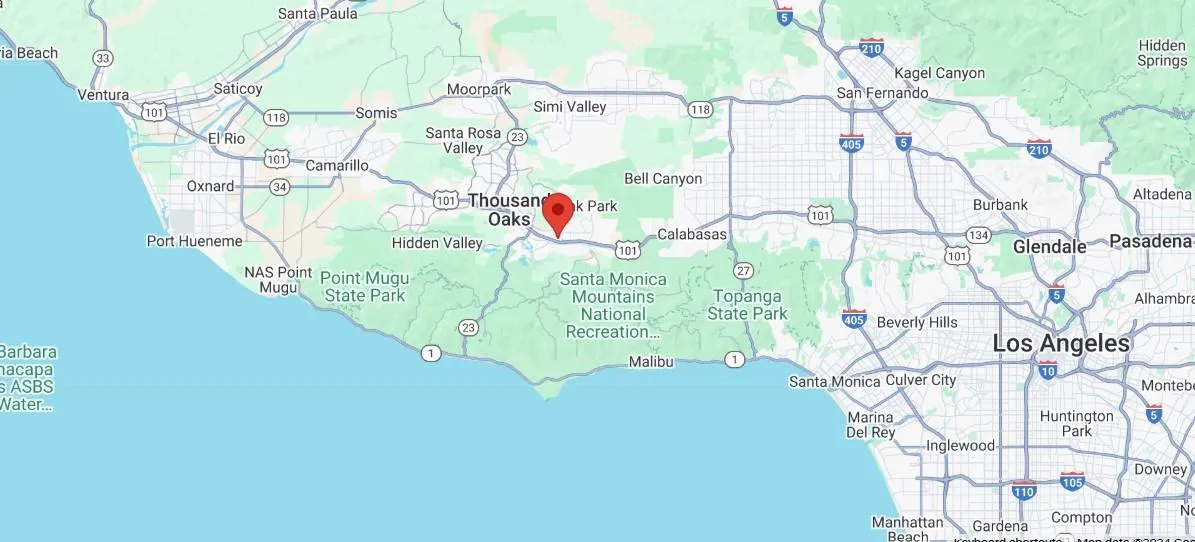
30721 Russell Ranch Rd Suite 140, Westlake Village, CA 91362
CUSTOMER CARE
Get In Touch
Mon – Thurs
10:00am – 4:00pm
Fridays by Appointment
Saturday, Golf
Sunday –hurch
LEGAL
Stay informed about how new technology can make or break a brand.
FOLLOW US


Invenire. Imperare. Excludere.
Be Found. Command. Exclude.
© 2026 BLEIA Search Box Intelligence Academy | All Rights Reserved.
1. SBO Foundations 2: Practical SBO Implementation 3: Deeper Strategy & Behavior
4: Advanced Tactics & Data 5: Expert / Future-Facing 6 Bonus Academy Series