
Why Do Two People Typing the Same Search Into Google See Totally Different Autocomplete Suggestions — And What Does That Mean for Your Brand?
Author; S.Raj, M.D, Reading Time: 5 Minutes
Google's Autocomplete Filters
Ever notice that two people typing the same search into Google see totally different autocomplete suggestions?
Consider this: 90% of users never scroll past those first autocomplete suggestions in the dropdown (Source: Search Influence Institute).
Your brand’s visibility is being decided by invisible algorithms—before anyone even completes typing, and hits search.
If you’re spending five, six, or even seven figures a month on Google Ads,
you’re likely hemorrhaging cash if you don’t understand how these filters shape your pre-click presence.
What Is Google's Autocomplete Feature and How Do Autocomplete Filters Shape Search Results?
Google’s autocomplete feature interprets real-time user input to suggest trending, high-intent queries—and it doesn’t serve the same suggestions to everyone. That means the list that appears as you type is filtered by location, device, and prior behavior. The core google’s autocomplete filters leverage data like search history, device type, and even trending searches to tailor your experience. This represents a hidden gatekeeper for brands:
unless
your service, product, or location is already among the suggested autocomplete terms,
you’re playing catch-up
long before your ads or
organic listings
can do their job.
What You’ll Learn
How Google’s autocomplete filters impact search results and brand discovery
Concrete frameworks for influencing autocomplete presence in your market
How to audit and maximize your brand’s autocomplete footprint
Specific actions to reduce PPC spend and improve organic discoverability

How Does Google's Autocomplete API Determine Which Suggestions Appear for Users in Different Locations?
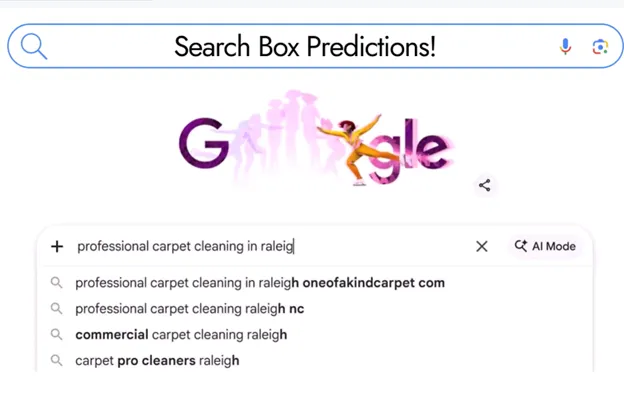
Answer: Google’s autocomplete API analyzes geo-specific trends, user session tokens, and local relevance when generating suggestions—with real business outcomes hinging on presence in that dropdown. If you’re a multi-location brand or franchise, the same service + city searches can yield totally different autocomplete results based on where the user types from. The autocomplete API relies on factors such as mobile device geolocation, repeated user input signals, and local trending queries. It’s not just “what people searched for before”; it’s what’s most relevant in their context. If you manually test your keywords from various regions (even using incognito mode), you’ll spot gaps and new opportunities for landing those coveted autocomplete spots that drive organic click share.
What Are the Primary Data Sources and Ranking Signals Powering Search Autocomplete and Trending Searches?
Autocomplete is a feature powered by a sprawling data structure: live search trends, local/behavioral data, and machine learning models trained to predict the next word or phrase a user might type. These data sources include current trending searches, recent breaking news events, prior user queries, and the most common queries within a market. Google uses its autocomplete API and search autocomplete service to process these signals and return a list of suggestions tailored for the “now”—not just historical data. Understanding what data source is influencing your queries is the first step to optimizing for visibility in the autocomplete dropdown.

How Does Google's Autocomplete Service Personalize or Localize Suggestions for My Brand?
Every autocomplete suggestion sent to a user is filtered through a personalized lens: search history, device, location, and even previous click behavior. For enterprise businesses, this means your brand might show up in autocomplete for your top market but remain invisible in another target region. Personalization algorithms in Google’s autocomplete service process session tokens (user-specific markers) and adjust results based on user location, intent, and recently popular queries. If your brand is absent from these suggestions, you’re invisible—no matter how much you invest in Google Ads.
Why Do Autocomplete Filters Matter for B2B and Enterprise Campaigns?
“90% of all web searchers never scroll past the first set of autocomplete suggestions.” — Search Influence Institute
Dominating the autocomplete filter is a force multiplier for enterprise and B2B campaigns. When your brand or product category becomes a default suggestion by Google, organic traffic and pre-qualified leads increase—while cost per click (CPC) and wasted ad spend drop.
Enterprise advertisers who study their search autocomplete footprint outperform competitors by evaluating which branded or location-based suggestions have the most commercial intent,
then shaping content and campaigns to win those slots. Ignoring autocomplete filters means you’re ceding market share and budget to more proactive rivals.
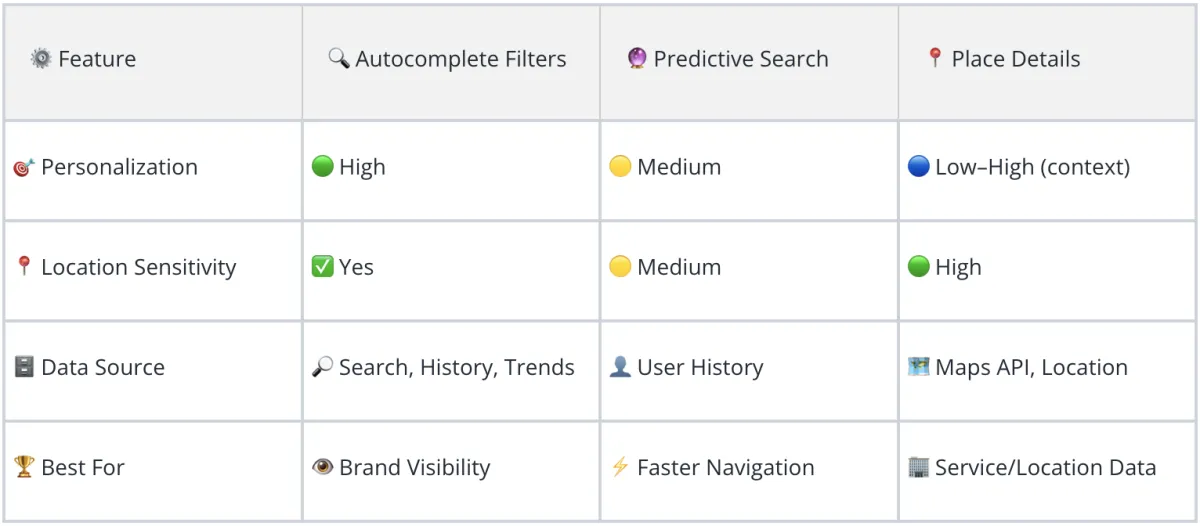
How Do Autocomplete Filters Differ From Predictive Search and Place Details Results?
Google’s autocomplete filters aren’t synonymous with predictive search or place details—each serves different intents, with varying effects on brand visibility and consumer navigation. Autocomplete filters shape initial user queries before anyone even hits enter. Predictive search uses past user history, while google’s place details taps into local results and business profiles—significantly impacting service-driven and location-based brands.

What Is the Exact Difference Between Predictive Search and the Autocomplete API?
Predictive search delivers dynamic suggestions based on user history, real-time activity, and app context, often tailored toward quicker navigation inside an application. Meanwhile, the autocomplete API integrates search trends, local geolocation, and relationship-scored content to assemble suggestion lists for broader, web-based queries. The main difference: autocomplete API pulls from a wider data source array—trending searches, user types, device signals—while predictive search personalizes within specific environments, like Google Maps or Search apps.
How Do Places Autocomplete and Place Details Affect Branded Search Requests?
Place details and places autocomplete work in tandem to associate physical business details (address, phone, services) with user queries. If your NAP (Name, Address, Phone) details are up to date, places autocomplete may suggest your brand before a user finishes typing—capturing traffic from “near me” and “best service in [city]” searches. Brands that rank highly in place details often achieve higher visibility in autocomplete suggestions, especially for location-intent queries.
Can Trending Searches or Autocomplete Requests Change Based on Business Signals?
Yes—autocomplete requests and trending searches adapt rapidly to breaking news, seasonal changes, or spikes in demand.
For instance, if a law firm launches a high-profile campaign or achieves a viral result, those signals feed into the autocomplete algorithm and can dramatically shift which branded terms appear for users in relevant locations.
Brands need to monitor trending searches regularly to capitalize on new autocomplete suggestion openings—or risk having their slot claimed by a nimble competitor.
What Factors Influence Which Autocomplete Suggestions Display
for Users in Different Locations or Demographics?
Autocomplete suggestions are determined by a blend of geolocation, relationship scoring, user input history, and trending keyword data. Google’s autocomplete filters evaluate which search terms are most relevant to a specific demographic, region, or device—resulting in distinct autocomplete suggestion lists for otherwise identical searches. The implications: Even small changes in your content, category association, or local citations can cause substantial swings in your brand’s autocomplete results based on user city or device.

How Do Geolocation, Search History, and Relationship Scoring Feed Into Google's Autocomplete Filters?
Location data—down to GPS granularity on mobile devices—determines which suggestions appear for “near me” or city-specific searches. Search history and relationship scoring (how often users click or engage with a brand) influence the likelihood your brand will surface in autocomplete.
Google’s autocomplete API factors session tokens, recent search queries, and even user engagement metrics to decide what rises to the top.
Understanding and actively managing these signals can unlock more consistent and widespread autocomplete visibility for your core commercial keywords.
How Can Business Owners Audit Their Autocomplete API Presence for Commercial Keywords?
Log out or use incognito mode
Type your main service + your city in Google
Take note: Does your business appear in the autocomplete dropdown?
Record all suggestions for each test
Monitor weekly for new or missing terms
Go beyond vanity searches—test all your target service + city variations and identify gaps. The reality: if your service or brand isn’t being suggested, your PPC efforts are working double-time (and bleeding budget) to reach those customers.
How Do Autocomplete Service Changes Impact Cost-Per-Click for High-Spend PPC Campaigns?
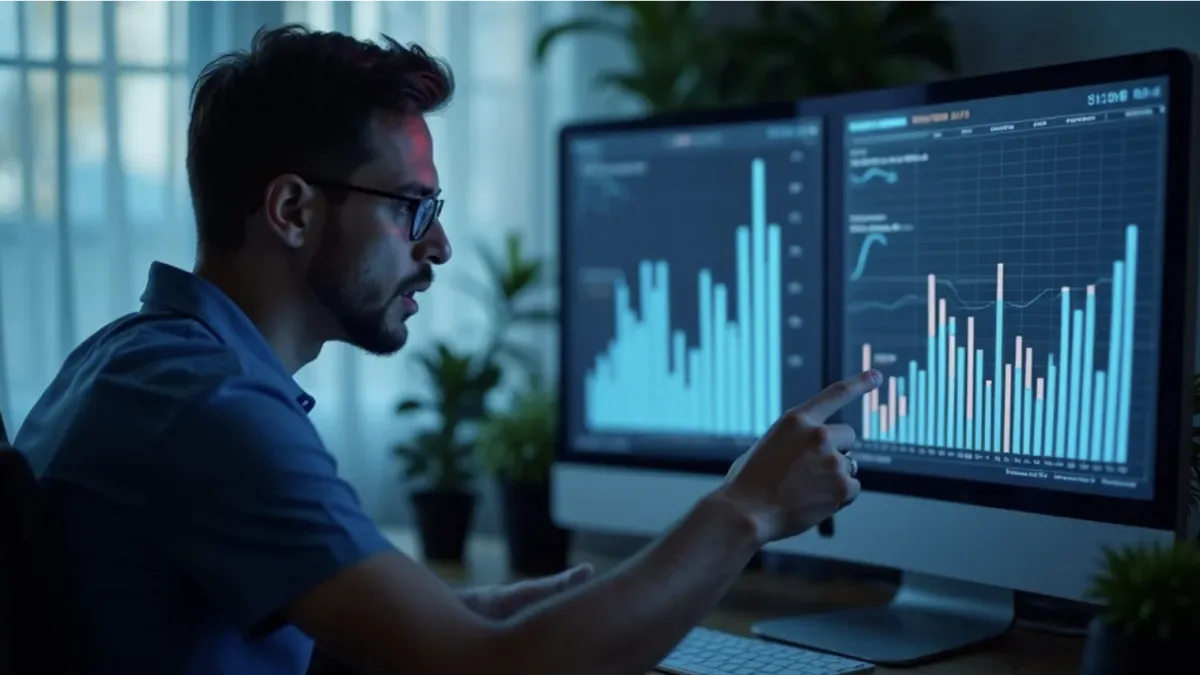
When autocomplete filters shift—whether due to algorithm updates or a surge in competitor content—your organic traffic can plummet and your cost-per-click on critical campaigns can climb. Brands not appearing in suggestion lists must bid higher to capture attention. By auditing and optimizing for search autocomplete, enterprise brands have seen up to 40% reductions in CPC, as more users select their brand directly from the dropdown suggestions rather than clicking ads.
How Can Marketers Influence Autocomplete Request Outcomes With Proven Tactics?
“Brands appearing in autocomplete suggestions receive up to 3x more organic clicks.” — Moz Research, 2023
Marketers can influence autocomplete request outcomes by:
Optimizing on-site content for high-intent search terms
Ensuring business info is consistent across web directories
Generating local and intent-qualified reviews
Encouraging branded search volume through campaigns
Monitoring trending searches and adjusting content promptly
With SBO frameworks, you assess your current footprint, identify missing suggestion opportunities, and launch proactive campaigns to fill those holes—reducing reliance on paid traffic.
How Can Business Owners and CEOs Use Data-Driven Frameworks to Dominate Google's Autocomplete Filters?
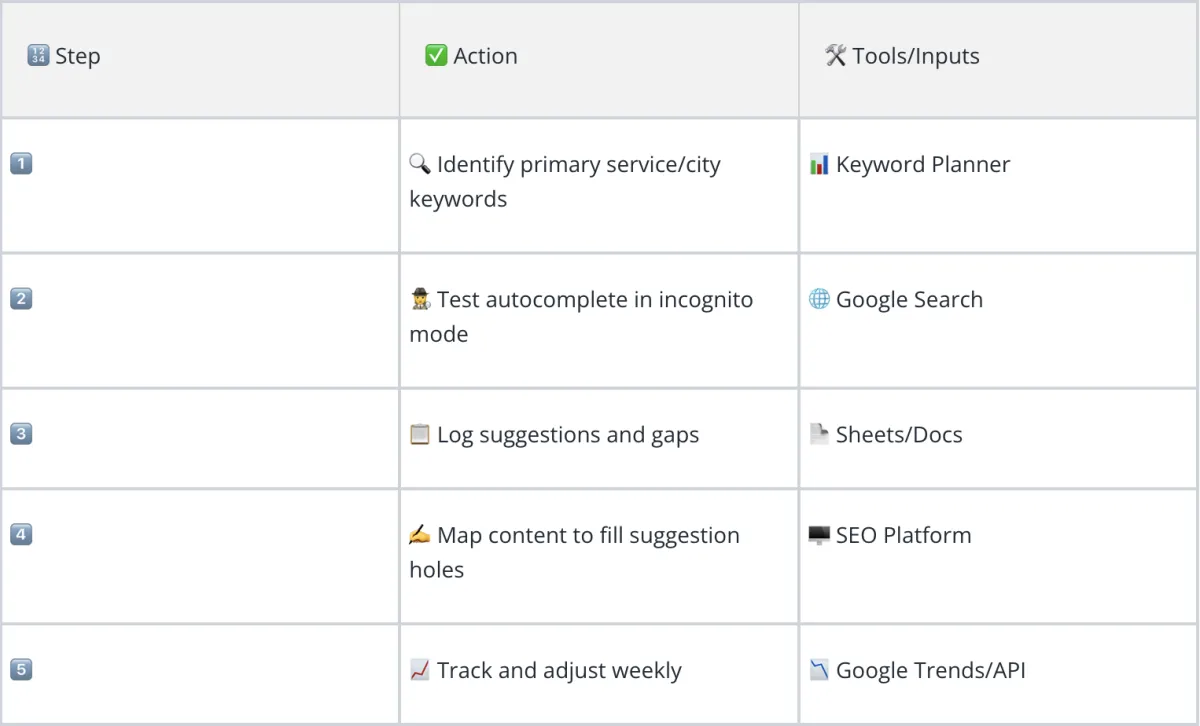
Winning the autocomplete slot requires a strategy—the SBO Framework—built around data audits, content mapping, and continuous tracking of commercial keywords.
Top-performing CEOs, marketing directors, and multi-location brands leverage these protocols to shield themselves from algorithm shifts and amplify organic discovery.

What Is the SBO Framework for Capturing High-Value Autocomplete Spots?
1. Identify primary service/city keywords — Use Keyword Planner to find top commercial queries by location
2. Test autocomplete in incognito mode — Check which brands or suggestions currently appear
3. Log suggestions and gaps — Maintain an evolving spreadsheet of autocomplete results
4. Map content to fill suggestion holes — Create or refine content to target unclaimed or competitor-held terms
5. Track and adjust weekly — Monitor with Google Trends or API tools to spot shifts and new opportunities
How Do You Optimize Content and Landing Pages for Search Autocomplete and Trending Searches?
Align your landing page titles, meta descriptions, and on-page content with the search terms you want to dominate in autocomplete. Incorporate trending searches, address local modifiers, and keep NAP data consistent everywhere your business appears online. Use relationship-scored strategies—encourage branded searches and engagement—to create sustained growth within autocomplete suggestions. The result is higher organic click share and lower dependency on paid search spend.
What Roles Do Location, Branded Modifiers, and Competitor Analysis Play in Successful Autocomplete Campaigns?
Location signals and branded modifiers (“best HVAC in Boston”) dominate autocomplete suggestion rankings for commercial searches. Mapping which competitors typically hold those autocomplete slots allows you to target content and local outreach—replacing competitor rankings with your own over time.
How Can Relationship-Scored and Intent-Qualified Content Strategies Improve Autocomplete Visibility and Reduce Paid Ad Costs?
High-quality, relationship-driven content earns repeat engagement, which the autocomplete API interprets as greater user value. The more often users select your brand or service from autocomplete, the more Google learns to prioritize it, securing better suggestion positioning and lower long-term PPC costs.
What Is a Real-World Example of Google's Autocomplete Filters Changing a Brand's Search Performance?
Here’s how one legal practice slashed their cost-per-click (CPC) by 40% simply by optimizing for trending searches and places autocomplete.
Case Study: How One Multi-Location Legal Practice Achieved 40% Lower CPC by Optimizing for Autocomplete

A national law firm with offices in 10 major cities noticed competitor firms occupying the top autocomplete suggestions for “car accident lawyer + [city]”. Their team audited Google’s search autocomplete and places autocomplete, identifying missing branded modifiers and high-volume trending searches. Strategic content rewrites and local business listings were implemented weekly. Result: Within 45 days, their brand began appearing in the primary autocomplete suggestions in six out of ten cities. Organic click share rose, and PPC costs dropped by 40%, as more users clicked suggested branded terms rather than competing generic ads.
What Does the Data Reveal About Pre-Click Invisibility and Brand Outcomes?
Without autocomplete presence, brands pay 2–3x more per click to appear for the same user queries. The law firm’s improved autocomplete footprint delivered higher conversion rates and more inbound leads—before users ever saw a paid ad.
“Autocomplete isn’t just convenience—it’s a gatekeeper for your brand before the search ever happens.” — S. Raj, TheSBOProtocol.com
How Do You Manage and Optimize Google Autocomplete for Your Brand and Reduce Wasted PPC Spend?

Brand leaders need an ongoing protocol to control, audit, and optimize autocomplete results—because suggestion slots can shift monthly or even weekly. Ignoring this channel hands control (and market share) to hyper-local upstarts and big-budget competitors alike.
What Are the Steps to Audit Search Autocomplete Suggestions for Your Business?
Use incognito windows or signed-out browsers for testing
Type all service, product, and city keyword combos
Log which autocomplete suggestions appear (and which don’t)
Update site content with high-commercial-intent and branded phrases
Establish consistent NAP listings across directories
How Can Brands Influence Future Autocomplete Requests — Tactical Checklist
Create topic clusters targeting high-intent commercial queries
Drive branded search traffic with PR and review campaigns
Monitor shifting autocomplete suggestions every week
Quickly update landing pages to match trending search behavior
What Tools and APIs Exist to Monitor and Control Autocomplete API Results?
Google Trends (detects spikes in trending searches and topics)
Google Search Console (monitors impressions and search queries)
Third-party SEO APIs (track autocomplete changes for large-scale brands)
Sheets/Docs for suggestion logging across locations
How Can You Align Content to Trending Searches, Place Details, and Autocomplete Filters for Maximum Visibility?
Continually optimize your on-page content for new trending searches, update business details for local relevance, and analyze competitor autocomplete presence to spot opportunities. Aligning content and technical SEO with the latest autocomplete search behaviors is a secret weapon for reducing paid ad dependency and capturing more organic leads.
Keywords
Google’s autocomplete filters decide your brand’s fate before the search even starts
Personalization, geolocation, and relationship scores are invisible drivers of autocomplete visibility
SBO frameworks empower enterprise and high-spend advertisers to audit and influence autocomplete at scale
Ignoring autocomplete means ceding ground (and major dollars) to your competitors
What Are the Most Frequently Asked Questions About Google's Autocomplete Filters and Autocomplete API?
What Is Google's Autocomplete Feature?
Google's Autocomplete is a feature that anticipates and suggests possible search queries as a user types, drawing on trending searches, past queries, and location signals. It accelerates the search process, but also determines which brands are visible before a user completes their search term—making it a critical touchpoint for brand discovery and PPC efficiency.
How Do I Manage Google Autocomplete for My Brand?
Brands can’t directly “control” Google Autocomplete, but you can influence it by optimizing your content for target keywords, keeping your business information consistent across directories, monitoring trending searches, and building relationship-scored, intent-qualified landing pages. Continuous auditing and competitive analysis are essential.
What Is the Difference Between Predictive Search and Autocomplete?
Predictive search uses app or user-specific data for faster, context-aware navigation—like autofilling emails or addresses. Google Autocomplete, however, aggregates trending, historical, and locational data to suggest popular web queries to all users in a market, shaping broader brand discovery and clickthrough rates.
How Do I Change the Autofill on Google Search?
To “change” autofill results, update your content to target specific queries, search regularly in incognito to identify gaps, and focus on increasing branded or local search volume. Over time, as your brand builds more relevance and user engagement, autocomplete suggestions will begin featuring your business more prominently.
What Are People Also Asking About Google Autocomplete Filters and Search Suggestions?
What Is Google's Autocomplete Feature?
Google’s Autocomplete instantly suggests phrases as you type, drawing on search data, trending topics, and your local area—essentially guessing your intent and helping you discover information (or businesses) faster.
How Do I Manage Google Autocomplete?
Start by auditing your own autocomplete presence with incognito mode and multiple location tests, then update your key landing pages and business directories. Regularly monitor shifts in suggestions, especially after running large campaigns, to stay ahead of changes.
What Is the Difference Between Predictive Search and Autocomplete?
Predictive search works within apps, customizing for user sessions and current activity; autocomplete works at the search engine level, using broader market data, and is more influential in shaping who sees your brand online.
How Do I Change the Autofill on Google Search?
Brands can “influence” autofill by focusing on keyword-optimized content, regular audits, and driving more direct/branded searches. For individuals, clearing history or adjusting search settings can affect which suggestions come up, but enterprise change happens through strategic SEO action.
Ready To Verify Which Keywords And Locations Are Still Available For Your Brand’s Autocomplete Slots?
Try this right now: Open Google and type your service + your city — don’t hit enter. Just watch what autocomplete suggests. Is your brand there? If not, you’re invisible before the search even starts. Explore the full SBO playbook or chat with our AI agent at TheSBOProtocol.com.
S. Raj, M.D. / TheSBOProtocol.com.
Director Search Box Intelligence University,
International Association for Business Leaders Education-IABLEd
Sources
Moz – https://moz.com/blog/google-autocomplete-optimization
Google Developers – https://developers.google.com/maps/documentation/places/web-service/autocomplete
Search Engine Land – https://searchengineland.com/google-suggest-autocomplete-324468
Search Influence Institute – https://searchinfluence.com/blog/the-truth-about-google-autocomplete/
Google Support – https://support.google.com/websearch/answer/106230?hl=en

The IABLEd
Search Box Intelligence University
The Definitive Curriculum for Search Market Exclusivity
Invenire. Imperare. Excludere.
Be Found. Command. Exclude.
Command the Box. Control the Market.
Want Your World to Discover You,
the Easy Way?
Expertise without visibility is a missed opportunity.
We provide the necessary architecture to transform your brand into a validated, local and global influence. Ask us how.
Copyright 2026. THE SBO PROTOCOL. All Rights Reserved.

* * * * *
COMPANY
30721 Russell Ranch Rd Suite 140, Westlake Village, CA 91362
CUSTOMER CARE
Get In Touch
Mon – Thurs
10:00am – 4:00pm
Fridays by Appointment
Saturday, Golf
Sunday –hurch
LEGAL
Stay informed about how new technology can make or break a brand.
FOLLOW US


Invenire. Imperare. Excludere.
Be Found. Command. Exclude.
© 2026 IABLEd Search Box Intelligence Academy | All Rights Reserved.
1. SBO Foundations 2: Practical SBO Implementation 3: Deeper Strategy & Behavior
4: Advanced Tactics & Data 5: Expert / Future-Facing 6 Bonus Academy Series